
• About
    • Who We Are
    • What We Do
    • The Management Team
    • Global
  • Solutions
    • Microsoft Dynamics 365 CRM Development
    • Cloud Technology
    • Business Central Development
    • Data and AI
    • Enterprise Content Search
  • Services
    • AI Solutions
      • Getting Ready for AI
      • Dynamics 365 Agents
      • ECLEVA Agents
    • Business Systems Consulting
    • Enterprise Resource Planning (ERP)
      • Wiise Business Central
    • Customer Engagement (CRM) & Marketing Automation
    • Business Intelligence (Power BI)
    • Rapid Application Development (PowerApps)
      • HSE App by ECLEVA
    • Process Automation (RPA)
  • Sectors
    • Corporate & SME
    • Not-For-Profit
    • Construction
    • Financial Services
    • Education
    • Manufacturing
    • Government
  • Customer Stories
  • Insights
    • Blog
    • News
    • Videos
  • Contact
    • Contact ECLEVA
    • Customer Support
+61 2 9467 9300
Get in touch
  • About
    • Who We Are
    • What We Do
    • The Management Team
    • Global
  • Solutions
    • Microsoft Dynamics 365 CRM Development
    • Cloud Technology
    • Business Central Development
    • Data and AI
    • Enterprise Content Search
  • Services
    • AI Solutions
      • Getting Ready for AI
      • Dynamics 365 Agents
      • ECLEVA Agents
    • Business Systems Consulting
    • Enterprise Resource Planning (ERP)
      • Wiise Business Central
    • Customer Engagement (CRM) & Marketing Automation
    • Business Intelligence (Power BI)
    • Rapid Application Development (PowerApps)
      • HSE App by ECLEVA
    • Process Automation (RPA)
  • Sectors
    • Corporate & SME
    • Not-For-Profit
    • Construction
    • Financial Services
    • Education
    • Manufacturing
    • Government
  • Customer Stories
  • Insights
    • Blog
    • News
    • Videos
  • Contact
    • Contact ECLEVA
    • Customer Support
+61 2 9467 9300
Get in touch
  • About
    • Who We Are
    • What We Do
    • The Management Team
    • Global
  • Solutions
    • Microsoft Dynamics 365 CRM Development
    • Cloud Technology
    • Business Central Development
    • Data and AI
    • Enterprise Content Search
  • Services
    • AI Solutions
      • Getting Ready for AI
      • Dynamics 365 Agents
      • ECLEVA Agents
    • Business Systems Consulting
    • Enterprise Resource Planning (ERP)
      • Wiise Business Central
    • Customer Engagement (CRM) & Marketing Automation
    • Business Intelligence (Power BI)
    • Rapid Application Development (PowerApps)
      • HSE App by ECLEVA
    • Process Automation (RPA)
  • Sectors
    • Corporate & SME
    • Not-For-Profit
    • Construction
    • Financial Services
    • Education
    • Manufacturing
    • Government
  • Customer Stories
  • Insights
    • Blog
    • News
    • Videos
  • Contact
    • Contact ECLEVA
    • Customer Support
  • About
    • Who We Are
    • What We Do
    • The Management Team
    • Global
  • Solutions
    • Microsoft Dynamics 365 CRM Development
    • Cloud Technology
    • Business Central Development
    • Data and AI
    • Enterprise Content Search
  • Services
    • AI Solutions
      • Getting Ready for AI
      • Dynamics 365 Agents
      • ECLEVA Agents
    • Business Systems Consulting
    • Enterprise Resource Planning (ERP)
      • Wiise Business Central
    • Customer Engagement (CRM) & Marketing Automation
    • Business Intelligence (Power BI)
    • Rapid Application Development (PowerApps)
      • HSE App by ECLEVA
    • Process Automation (RPA)
  • Sectors
    • Corporate & SME
    • Not-For-Profit
    • Construction
    • Financial Services
    • Education
    • Manufacturing
    • Government
  • Customer Stories
  • Insights
    • Blog
    • News
    • Videos
  • Contact
    • Contact ECLEVA
    • Customer Support

Blog

Home Uncategorized All about hierarchy visualizations in CRM 2015
IT

All about hierarchy visualizations in CRM 2015

November 18, 2019

The two most awaited things that Microsoft has introduced in CRM 2015.


  1. Hierarchy Visualizations: It gives you the ability to see the insight of any record in a hierarchical manner. The best thing about this, it is not restricted to the account entity only, you can even setup this for custom entities as well.
  2. Hierarchy Security: In earlier versions we could only setup the security in CRM, based on User or Team Security Roles and sharing particular records between users or teams. But it was always felt that there should be a way for Managers to easily work or view their subordinate’s items. And in CRM 2015 we can achieve this by using Hierarchy Security.


This blog will explain all about Hierarchy Visualizations, and in a subsequent blog we will explain about Hierarchy Security.


Hierarchy Visualizations:

We can get valuable business insights by visualizing hierarchically related data. And it gives you a number of benefits


  • View and explore complex hierarchical information.
  • View key performance indicators (KPIs) in the contextual view of a hierarchy.
  • Visually analyze key information across the web and tablets.


In the below screen, you can see the Hierarchy of an entire “Contoso Corporation” organization.

blog-1


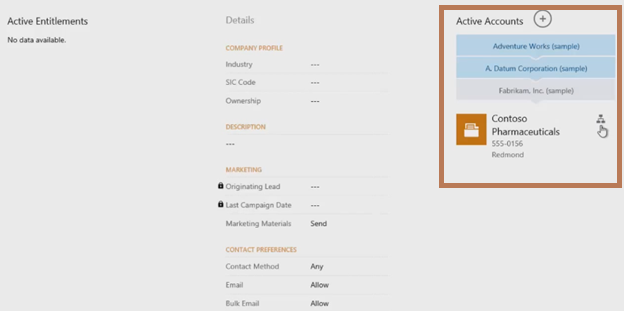
And Microsoft has enabled the Hierarchy for Tablet clients as well. As shown below.
blog-1-1

Some Important points for Hierarchy Visualizations:


  • Hierarchy Visualization is controlled by relationships, and specifically self-referential relationships. It means that the primary entity and the related entity must be the same.
  • Only one (1: N) self-referential relationship per entity can be set as hierarchical. In this relationship the primary entity and the related entity must be of the same type, such as account_parent_account.
  • Can’t change hierarchy relationship for OOB entities.
  • Business unit is not enabled for Hierarchy Visualizations.
  • Custom entities are supported.
  • Only the first 4 fields of the Quick view form will be displayed on the KPI tile in hierarchy.
  • Only the Quick view form is supported for the KPI tiles in hierarchy.
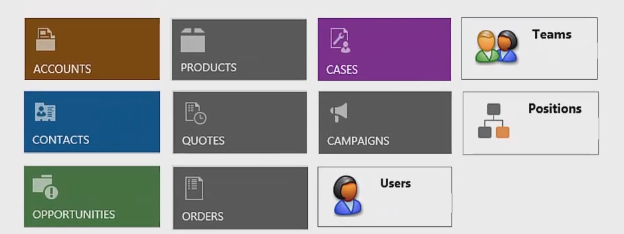
  • Only the following OOB entities are enabled for hierarchy visualization. You can’t enable other OOB entities.
blog-1-2
Using Advanced Find or the CRM API, you can query data in CRM.


Hierarchical data structures are supported by self-referential one-to-many (1:N) relationships of the related records. In the past, to view hierarchical data, you had to iteratively query for the related records. Now, you can query the related data as a hierarchy, in one step. You’ll be able to query records using the Under and Not Under logic. The Under and Not Under hierarchical operators are exposed in Advanced Find and the workflow editor as well.
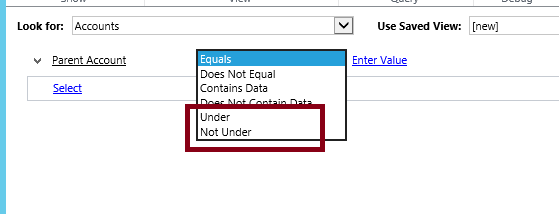
blog-1-3
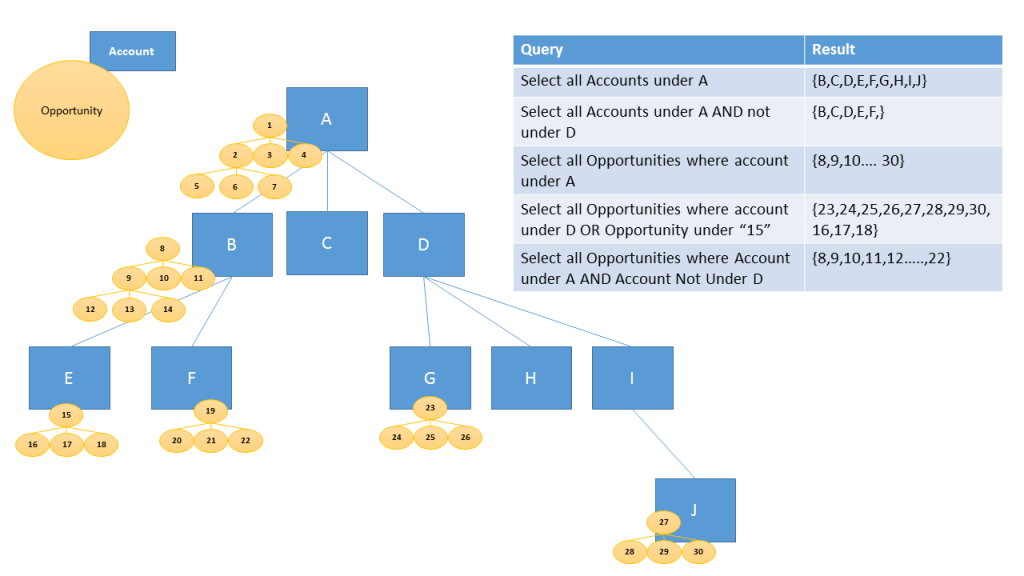
The below image represents this, what result you will get, when you do the Query on the Hierarchal data.
blog-1-4

How to setup Hierarchical Visualization for a custom entity:

For a custom entity like new_widget, you need to create (1:N) self-referential relationship like new_new_widget_new_widget and mark it as hierarchical, as shown here.
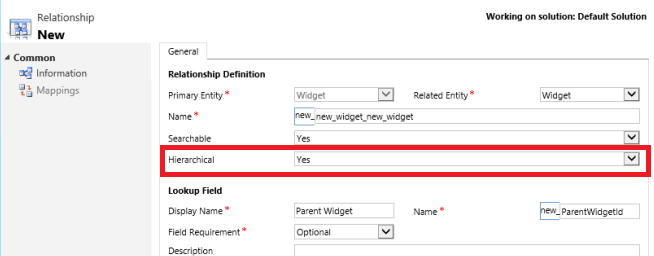
blog-1-5

To change the Hierarchy Visualization settings, you need to go to the Solution, and under the new_widget entity, go to the Hierarchy Settings. There you can setup the Default Quick view form. As shown below.
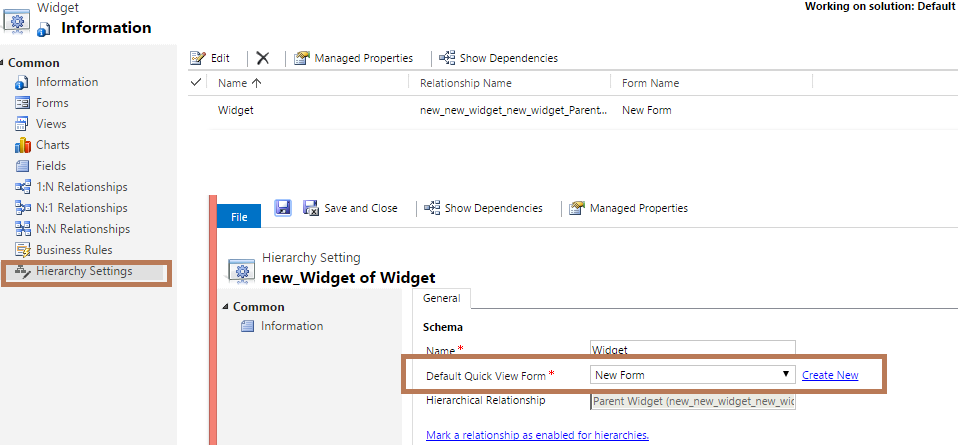
blog-1-6
After entering the Hierarchy Settings for the Widget entity, you will be able to see the hierarchy representation.
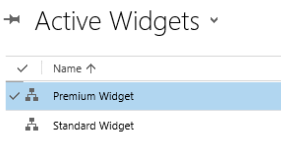
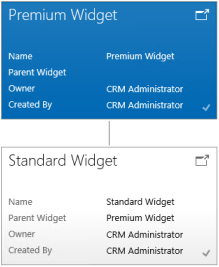
blog-1-7

blog-1-8
Hence it seems, that Hierarchy Visualization is a very powerful function, with which to view the insight of a record. But it still seems that one thing is missing; we can’t setup Visualization for cross entity relationships.


For example, you can depict the account hierarchy showing accounts at multiple levels, but you can’t show accounts and contacts in the same hierarchy visualization.


We hope that Microsoft will enable this functionality for cross entity relationships in near future.


I hope this has helped!!!

In Next blog we will discuss details about Hierarchy Security.

CRM hierarchy visualisation Dynamics CRM 2015
146
Configure Microsoft Dynamics marketing connector for CRM on-premises/IFDConfigure Microsoft Dynamics marketing connector for CRM on-premises/IFDNovember 18, 2019
All about hierarchy security in CRM 2015November 18, 2019All about hierarchy security in CRM 2015
Categories
  • Blog (41)
    • AI (3)
    • Business (10)
    • Business Intelligence​ (3)
    • Digital Transformation (10)
    • IT (21)
    • Marketing (1)
  • News (18)
    • Business (11)
    • IT (5)
    • Sales (2)
  • Uncategorized (1)
  • Video (34)
    • Business (29)
    • Business intelligence (3)
    • Digital transformation (18)
    • IT (23)
    • Process automation (2)
Recent Posts
  • Reconciliation Reimagined: How Copilot and Business Central Transform Finance Operations
  • test
  • Business Central or CRM First? How Senior Leaders Can Make the Right Call
  • ECLEVA Presents: Real Ways AI Can Power Your Business
  • Developing Intelligent Supply Chains with Microsoft Dynamics 365 for Supply Chain Management


ECLEVA
© ECLEVA 2026.

All rights reserved.
Privacy Policy

Solutions

Business Systems Consulting

Customer Engagement (CRM) & Marketing Automation

Rapid Application Development (PowerApps)

Process Automation (RPA)

Business Intelligence (Power BI)

Sectors

Corporate & SME

Not-for-profit

Construction

Financial Services

Education

Contact

Address:

Level 11, 56 Berry Street,
North Sydney, NSW 2060

Phone:

+61 2 9467 9300

Address:

401-402, R M Arcade, Near Goverdhan Park, Taxsila School Road, Vastral, Ahmedabad 382418

Phone:

+91 98244 60130

Website:

www.ecleva.com

#integrio_button_695624ea984d2 .wgl_button_link { color: rgba(255,255,255,1); }#integrio_button_695624ea984d2 .wgl_button_link:hover { color: rgba(12,90,219,1); }#integrio_button_695624ea984d2 .wgl_button_link { border-color: rgba(255,255,255,1); background-color: rgba(49,49,49,0.01); }#integrio_button_695624ea984d2 .wgl_button_link:hover { border-color: rgba(255,255,255,1); background-color: rgba(255,255,255,1); }#integrio_button_695624ea984d2.effect_3d .link_wrapper { color: rgba(255,255,255,1); }#integrio_button_695624ea9a9f0 .wgl_button_link { color: rgba(255,255,255,1); }#integrio_button_695624ea9a9f0 .wgl_button_link:hover { color: rgba(12,90,219,1); }#integrio_button_695624ea9a9f0 .wgl_button_link { border-color: rgba(255,255,255,1); background-color: rgba(49,49,49,0); }#integrio_button_695624ea9a9f0 .wgl_button_link:hover { border-color: rgba(255,255,255,1); background-color: rgba(255,255,255,1); }#integrio_button_695624ea9a9f0.effect_3d .link_wrapper { color: rgba(255,255,255,1); }#integrio_button_695624eaa41f7 .wgl_button_link { color: rgba(49,49,49,1); }#integrio_button_695624eaa41f7 .wgl_button_link:hover { color: rgba(255,255,255,1); }#integrio_button_695624eaa41f7 .wgl_button_link { border-color: rgba(12,90,219,1); background-color: rgba(49,49,49,0.01); }#integrio_button_695624eaa41f7 .wgl_button_link:hover { border-color: rgba(12,90,219,1); background-color: rgba(12,90,219,1); }#integrio_button_695624eaa41f7.effect_3d .link_wrapper { color: rgba(12,90,219,1); }#integrio_button_695624eaa680d .wgl_button_link { color: rgba(49,49,49,1); }#integrio_button_695624eaa680d .wgl_button_link:hover { color: rgba(255,255,255,1); }#integrio_button_695624eaa680d .wgl_button_link { border-color: rgba(12,90,219,1); background-color: rgba(49,49,49,0); }#integrio_button_695624eaa680d .wgl_button_link:hover { border-color: rgba(12,90,219,1); background-color: rgba(12,90,219,1); }#integrio_button_695624eaa680d.effect_3d .link_wrapper { color: rgba(12,90,219,1); }#integrio_soc_icon_wrap_695624eacc37d a{ background: #0C5ADB; border-color: transparent; }#integrio_soc_icon_wrap_695624eacc37d a:hover{ background: #ffffff; border-color: #0C5ADB; }#integrio_soc_icon_wrap_695624eacc37d a{ color: #ffffff; }#integrio_soc_icon_wrap_695624eacc37d a:hover{ color: #0C5ADB; }.integrio_module_social #soc_icon_695624eacc3dd1{ color: #ffffff; }.integrio_module_social #soc_icon_695624eacc3dd1:hover{ color: #ffffff; }.integrio_module_social #soc_icon_695624eacc3dd1{ background: #44b1e4; }.integrio_module_social #soc_icon_695624eacc3dd1:hover{ background: #44b1e4; }.integrio_module_social #soc_icon_695624eacc4082{ color: #ffffff; }.integrio_module_social #soc_icon_695624eacc4082:hover{ color: #ffffff; }.integrio_module_social #soc_icon_695624eacc4082{ background: #0077b5; }.integrio_module_social #soc_icon_695624eacc4082:hover{ background: #0077b5; }
Slide

In-Workshop
Step 1: Discover Your Business Challenges

We begin by exploring the parts of your organisation where work feels slow, repetitive, inefficient or difficult to scale. This includes operational bottlenecks, manual processes, disconnected systems, high-touch workflows, and areas where teams rely heavily on workarounds. The goal is to understand the real challenges behind your daily operations so we can identify processes that are strong candidates for improvement, automation or AI assistance.

Slide
In-Workshop
Step 2: Prioritise What Matters Most

Not all problems are equal. In this stage, your team collaboratively prioritises the challenges identified, ranking them based on business impact, urgency, and strategic importance.

This ensures the workshop stays focused on what truly matters — not theoretical use cases — and that every opportunity we identify is anchored to real, agreed business priorities.

Slide
Post-Workshop
Step 3: Map AI & Automation Opportunities

Following the session, ECLEVA translates your prioritised challenges into practical AI and automation opportunities that align to your current Microsoft environment, such as:

Microsoft 365 & Copilot
Dynamics 365 & Business Central
Power Platform (Power Apps, Power Automate, Power BI)
Each opportunity is assessed using a Value × Ease framework, clearly highlighting:

Quick wins
High-impact initiatives
Opportunities requiring more planning or investment
We then present these findings back to your team, walking you through the prioritisation, recommended sequencing, and logical next steps. You’ll receive a clear, visual prioritisation that makes decision-making easy.

Slide
Post-Workshop + Optional Next Phase
Step 4: Feasibility & Readiness Check

We complete a high-level feasibility and readiness check, covering:

Data availability and quality
System and integration readiness
Security, governance, and compliance considerations
Risks, blockers, and any preparation required
The outcome is a clear, actionable roadmap outlining recommended next steps, sequencing, and indicative effort.

If you choose to proceed, ECLEVA can support you through:

Detailed solution design
Proofs of concept or pilots
Implementation and change enablement
Always at your pace, aligned to your goals.

Slide
LEAVE WITH A CLEAR, ACTIONABLE ROADMAP
Step 5: Recommended Next Steps

At the end of the workshop, we consolidate your insights into a clear, practical set of next steps. This includes prioritized opportunities, suggested sequencing, indicative effort levels and a path that aligns to your goals, technology landscape and operational priorities. You leave with an actionable starting point — something you can share with leadership or use to guide your internal planning.

previous arrow
next arrow