
• About
    • Who We Are
    • What We Do
    • The Management Team
    • Global
  • Solutions
    • Microsoft Dynamics 365 CRM Development
    • Cloud Technology
    • Business Central Development
    • Data and AI
    • Enterprise Content Search
  • Services
    • AI Solutions
      • Getting Ready for AI
      • Dynamics 365 Agents
      • ECLEVA Agents
    • Business Systems Consulting
    • Enterprise Resource Planning (ERP)
      • Wiise Business Central
    • Customer Engagement (CRM) & Marketing Automation
    • Business Intelligence (Power BI)
    • Rapid Application Development (PowerApps)
      • HSE App by ECLEVA
    • Process Automation (RPA)
  • Sectors
    • Corporate & SME
    • Not-For-Profit
    • Construction
    • Financial Services
    • Education
    • Manufacturing
    • Government
  • Customer Stories
  • Insights
    • Blog
    • News
    • Videos
  • Contact
    • Contact ECLEVA
    • Customer Support
+61 2 9467 9300
Get in touch
  • About
    • Who We Are
    • What We Do
    • The Management Team
    • Global
  • Solutions
    • Microsoft Dynamics 365 CRM Development
    • Cloud Technology
    • Business Central Development
    • Data and AI
    • Enterprise Content Search
  • Services
    • AI Solutions
      • Getting Ready for AI
      • Dynamics 365 Agents
      • ECLEVA Agents
    • Business Systems Consulting
    • Enterprise Resource Planning (ERP)
      • Wiise Business Central
    • Customer Engagement (CRM) & Marketing Automation
    • Business Intelligence (Power BI)
    • Rapid Application Development (PowerApps)
      • HSE App by ECLEVA
    • Process Automation (RPA)
  • Sectors
    • Corporate & SME
    • Not-For-Profit
    • Construction
    • Financial Services
    • Education
    • Manufacturing
    • Government
  • Customer Stories
  • Insights
    • Blog
    • News
    • Videos
  • Contact
    • Contact ECLEVA
    • Customer Support
+61 2 9467 9300
Get in touch
  • About
    • Who We Are
    • What We Do
    • The Management Team
    • Global
  • Solutions
    • Microsoft Dynamics 365 CRM Development
    • Cloud Technology
    • Business Central Development
    • Data and AI
    • Enterprise Content Search
  • Services
    • AI Solutions
      • Getting Ready for AI
      • Dynamics 365 Agents
      • ECLEVA Agents
    • Business Systems Consulting
    • Enterprise Resource Planning (ERP)
      • Wiise Business Central
    • Customer Engagement (CRM) & Marketing Automation
    • Business Intelligence (Power BI)
    • Rapid Application Development (PowerApps)
      • HSE App by ECLEVA
    • Process Automation (RPA)
  • Sectors
    • Corporate & SME
    • Not-For-Profit
    • Construction
    • Financial Services
    • Education
    • Manufacturing
    • Government
  • Customer Stories
  • Insights
    • Blog
    • News
    • Videos
  • Contact
    • Contact ECLEVA
    • Customer Support
  • About
    • Who We Are
    • What We Do
    • The Management Team
    • Global
  • Solutions
    • Microsoft Dynamics 365 CRM Development
    • Cloud Technology
    • Business Central Development
    • Data and AI
    • Enterprise Content Search
  • Services
    • AI Solutions
      • Getting Ready for AI
      • Dynamics 365 Agents
      • ECLEVA Agents
    • Business Systems Consulting
    • Enterprise Resource Planning (ERP)
      • Wiise Business Central
    • Customer Engagement (CRM) & Marketing Automation
    • Business Intelligence (Power BI)
    • Rapid Application Development (PowerApps)
      • HSE App by ECLEVA
    • Process Automation (RPA)
  • Sectors
    • Corporate & SME
    • Not-For-Profit
    • Construction
    • Financial Services
    • Education
    • Manufacturing
    • Government
  • Customer Stories
  • Insights
    • Blog
    • News
    • Videos
  • Contact
    • Contact ECLEVA
    • Customer Support

Blog

Home Uncategorized UI Migration Stories: How to fix issues with Business Process Flow not moving automatically
IT

UI Migration Stories: How to fix issues with Business Process Flow not moving automatically

February 6, 2020

At ECLEVA, a leading Business Applications Consultancy, we specialize in delivering cutting-edge automation solutions for our clients. Our deep industry and technical expertise often lead us to explore the limits of existing technologies—uncovering bugs and vulnerabilities along the way. In this blog, we share our latest discovery regarding Microsoft Dynamics 365 Business Process Flow (BPF) automation issues and how we resolved them. This solution can help you if you encounter similar challenges. 

The Problem: Business Process Flow Not Advancing Automatically 

Many of our clients rely on Microsoft Dynamics 365 Business Process Flows to streamline workflows. We designed automated BPF transitions between stages based on specific conditions. However, when transitioning from the Classic Interface to the Unified Interface (UI), we encountered a critical issue: the BPF failed to progress automatically. 

This issue arose because Microsoft deprecated the Xrm.Utility.openEntityForm function, commonly used in the Classic Interface to refresh forms. As a result, when users attempted to update CRM fields in the Unified Interface, the automation broke, preventing the BPF from moving forward. Notably, this problem is unique to the UI and does not occur in the Classic Interface. 

The Solution: Replace Deprecated Functions with Updated Commands 

To resolve this issue, we replaced the deprecated Xrm.Utility.openEntityForm function with the updated Xrm.Navigation.openForm method. This simple adjustment successfully restored the automatic progression of the Business Process Flow in the Unified Interface. 
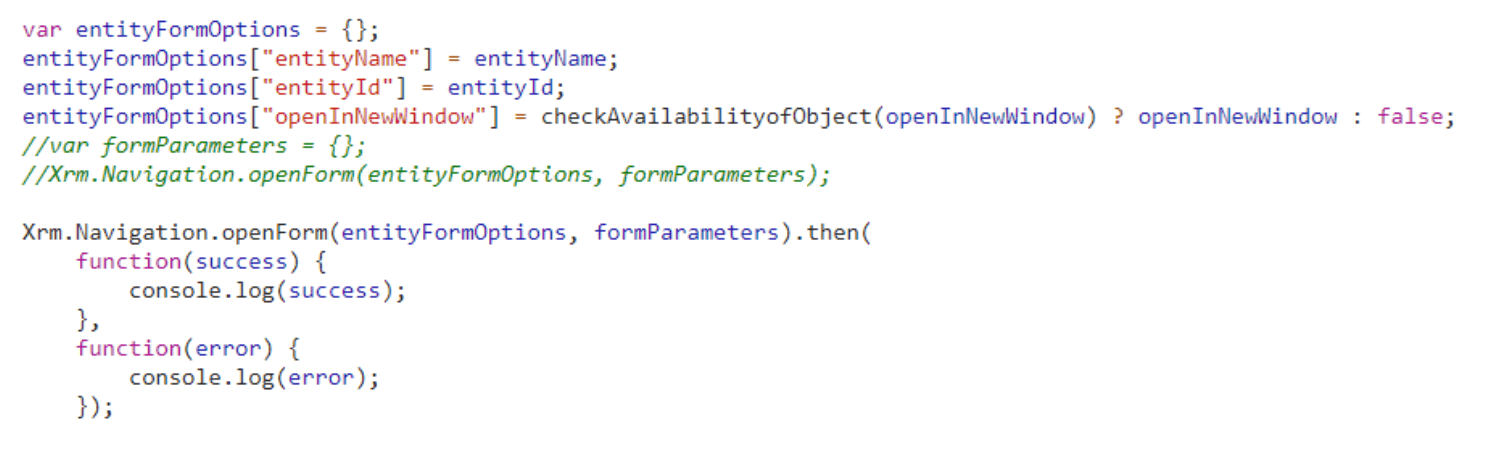
By implementing Xrm.Navigation.openForm, the system refreshes forms correctly, allowing the BPF to advance stages automatically as intended. 

Share Your Experience 

We hope this solution helps you address similar issues with Business Process Flow automation in Microsoft Dynamics 365. If you have any stories or insights about challenges in the Unified Interface, feel free to share them in the comments below! 

About ECLEVA 

ECLEVA is a trusted Microsoft Partner with over 20 years of experience in delivering innovative, cloud-based business solutions. We empower organizations with automation tools to enhance productivity and drive business growth. 

235
How to manage and utilise employees' skills and expertise: Resource Management in Dynamics 365 Project Service Automation (PSA)How to manage and utilise employees' skills and expertise: Resource Management in Dynamics 365 Project Service Automation (PSA)January 31, 2020
Microsoft Dynamics 365: On-Premise to Cloud MigrationFebruary 10, 2020Microsoft Dynamics 365: On-Premise to Cloud Migration
Categories
  • Blog (41)
    • AI (3)
    • Business (10)
    • Business Intelligence​ (3)
    • Digital Transformation (10)
    • IT (21)
    • Marketing (1)
  • News (18)
    • Business (11)
    • IT (5)
    • Sales (2)
  • Uncategorized (1)
  • Video (34)
    • Business (29)
    • Business intelligence (3)
    • Digital transformation (18)
    • IT (23)
    • Process automation (2)
Recent Posts
  • Reconciliation Reimagined: How Copilot and Business Central Transform Finance Operations
  • test
  • Business Central or CRM First? How Senior Leaders Can Make the Right Call
  • ECLEVA Presents: Real Ways AI Can Power Your Business
  • Developing Intelligent Supply Chains with Microsoft Dynamics 365 for Supply Chain Management


ECLEVA
© ECLEVA 2026.

All rights reserved.
Privacy Policy

Solutions

Business Systems Consulting

Customer Engagement (CRM) & Marketing Automation

Rapid Application Development (PowerApps)

Process Automation (RPA)

Business Intelligence (Power BI)

Sectors

Corporate & SME

Not-for-profit

Construction

Financial Services

Education

Contact

Address:

Level 11, 56 Berry Street,
North Sydney, NSW 2060

Phone:

+61 2 9467 9300

Address:

401-402, R M Arcade, Near Goverdhan Park, Taxsila School Road, Vastral, Ahmedabad 382418

Phone:

+91 98244 60130

Website:

www.ecleva.com

#integrio_button_698ca71d92c42 .wgl_button_link { color: rgba(255,255,255,1); }#integrio_button_698ca71d92c42 .wgl_button_link:hover { color: rgba(12,90,219,1); }#integrio_button_698ca71d92c42 .wgl_button_link { border-color: rgba(255,255,255,1); background-color: rgba(49,49,49,0.01); }#integrio_button_698ca71d92c42 .wgl_button_link:hover { border-color: rgba(255,255,255,1); background-color: rgba(255,255,255,1); }#integrio_button_698ca71d92c42.effect_3d .link_wrapper { color: rgba(255,255,255,1); }#integrio_button_698ca71d950b6 .wgl_button_link { color: rgba(255,255,255,1); }#integrio_button_698ca71d950b6 .wgl_button_link:hover { color: rgba(12,90,219,1); }#integrio_button_698ca71d950b6 .wgl_button_link { border-color: rgba(255,255,255,1); background-color: rgba(49,49,49,0); }#integrio_button_698ca71d950b6 .wgl_button_link:hover { border-color: rgba(255,255,255,1); background-color: rgba(255,255,255,1); }#integrio_button_698ca71d950b6.effect_3d .link_wrapper { color: rgba(255,255,255,1); }#integrio_button_698ca71d9dd56 .wgl_button_link { color: rgba(49,49,49,1); }#integrio_button_698ca71d9dd56 .wgl_button_link:hover { color: rgba(255,255,255,1); }#integrio_button_698ca71d9dd56 .wgl_button_link { border-color: rgba(12,90,219,1); background-color: rgba(49,49,49,0.01); }#integrio_button_698ca71d9dd56 .wgl_button_link:hover { border-color: rgba(12,90,219,1); background-color: rgba(12,90,219,1); }#integrio_button_698ca71d9dd56.effect_3d .link_wrapper { color: rgba(12,90,219,1); }#integrio_button_698ca71da01e5 .wgl_button_link { color: rgba(49,49,49,1); }#integrio_button_698ca71da01e5 .wgl_button_link:hover { color: rgba(255,255,255,1); }#integrio_button_698ca71da01e5 .wgl_button_link { border-color: rgba(12,90,219,1); background-color: rgba(49,49,49,0); }#integrio_button_698ca71da01e5 .wgl_button_link:hover { border-color: rgba(12,90,219,1); background-color: rgba(12,90,219,1); }#integrio_button_698ca71da01e5.effect_3d .link_wrapper { color: rgba(12,90,219,1); }#integrio_soc_icon_wrap_698ca71dd7cd9 a{ background: #0C5ADB; border-color: transparent; }#integrio_soc_icon_wrap_698ca71dd7cd9 a:hover{ background: #ffffff; border-color: #0C5ADB; }#integrio_soc_icon_wrap_698ca71dd7cd9 a{ color: #ffffff; }#integrio_soc_icon_wrap_698ca71dd7cd9 a:hover{ color: #0C5ADB; }.integrio_module_social #soc_icon_698ca71dd7d391{ color: #ffffff; }.integrio_module_social #soc_icon_698ca71dd7d391:hover{ color: #ffffff; }.integrio_module_social #soc_icon_698ca71dd7d391{ background: #44b1e4; }.integrio_module_social #soc_icon_698ca71dd7d391:hover{ background: #44b1e4; }.integrio_module_social #soc_icon_698ca71dd7d692{ color: #ffffff; }.integrio_module_social #soc_icon_698ca71dd7d692:hover{ color: #ffffff; }.integrio_module_social #soc_icon_698ca71dd7d692{ background: #0077b5; }.integrio_module_social #soc_icon_698ca71dd7d692:hover{ background: #0077b5; }
Slide
In-Workshop
Stage 1: Discover Your Business Challenges

We begin with a short, practical introduction to AI — focused on real business value, not hype — then shift quickly into understanding your organisation.


Together, we explore where work feels:

• Slow, manual, or repetitive
• Difficult to scale
• Dependent on workarounds or spreadsheets

• Fragmented across systems or teams


This stage uncovers the real operational and process challenges behind day-to-day friction, forming the foundation for meaningful AI opportunities.

Slide
In-Workshop
Stage 2: Prioritise What Matters Most

Not all problems are equal. In this stage, your team collaboratively prioritises the challenges identified, ranking them based on business impact, urgency, and strategic importance.


This ensures the workshop stays focused on what truly matters — not theoretical use cases — and that every opportunity we identify is anchored to real, agreed business priorities.

Slide
Post-Workshop
Stage 3: Map AI & Automation Opportunities

Following the session, ECLEVA translates your prioritised challenges into practical AI and automation opportunities that align to your current Microsoft environment, such as:

• Microsoft 365 & Copilot
• Dynamics 365 & Business Central
• Power Platform (Power Apps, Power Automate, Power BI)


Each opportunity is assessed using a Value × Ease framework, clearly highlighting:

• Quick wins
• High-impact initiatives
• Opportunities requiring more planning or investment


We then present these findings back to your team, walking you through the prioritisation, recommended sequencing, and logical next steps. You’ll receive a clear, visual prioritisation that makes decision-making easy.

Slide
Post-Workshop + Optional Next Phase
Stage 4: Feasibility, Readiness & Next Steps

We complete a high-level feasibility and readiness check, covering:

• Data availability and quality

• System and integration readiness

• Security, governance, and compliance considerations

• Risks, blockers, and any preparation required


The outcome is a clear, actionable roadmap outlining recommended next steps, sequencing, and indicative effort.


If you choose to proceed, ECLEVA can support you through:

• Detailed solution design

• Proofs of concept or pilots
• Implementation and change enablement


Always at your pace, aligned to your goals.

previous arrow
next arrow